
Product Specifications

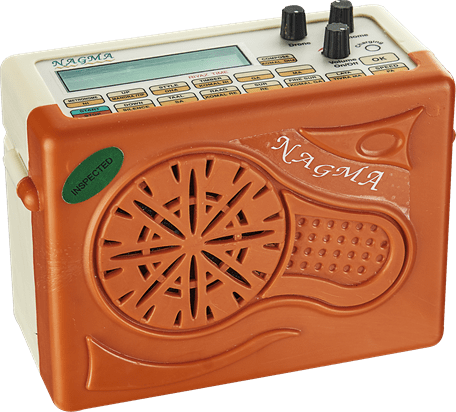
Feature’s of Electronic Lehra Machine, Nagma

20 Taals & 194 Tunes (Raga / Ragas)
- Nagma Lehra offers a wide range of raga in each taal there by creating a bouquet of 194 Ragas in 20 Taals.

Genuine Tone
- The Nagma is capable of producing a genuine harmonium tone of that of a single line harmonium, two-line harmonium & a three-line harmonium.

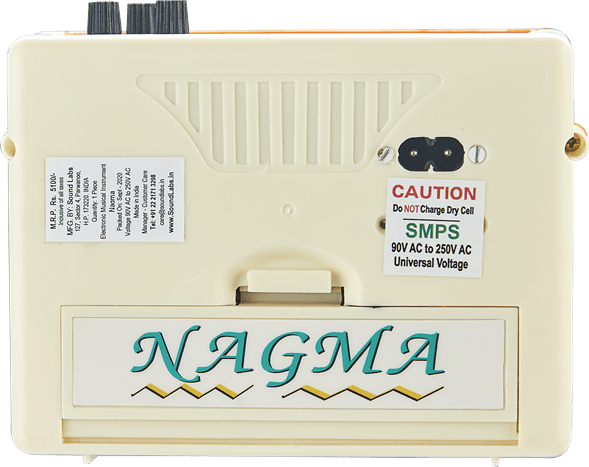
SMPS, Universal Power Supply
- Nagma’s in-built SMPS makes it possible to run the instrument anywhere in the world with its dynamic input power range of 90V AC to 250V AC.

ABS Plastic Case
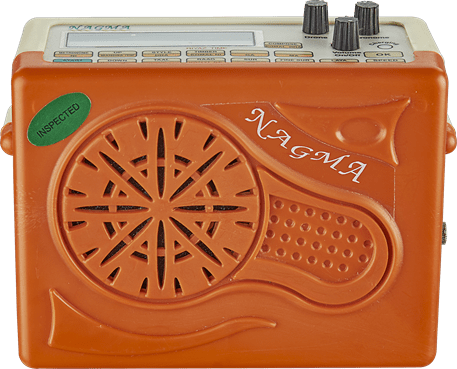
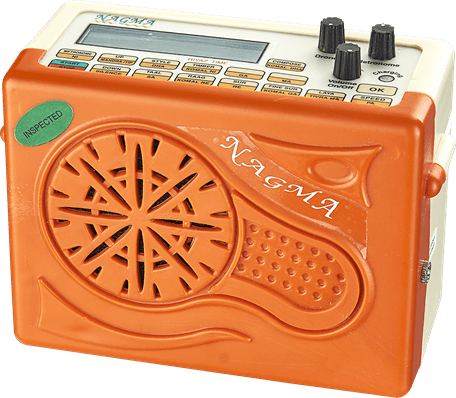
- The new-look Nagma is made from ABS plastic (Acrylonitrile Butadiene Styrene) which gives it a sleeker look and protects it from the peninsula’s climatic wear & tear.

7 Tone Combinations
- The timber function of this electronic Lehra helps produce a tone that of single, two-line & three-line harmonium thereby giving you an option of 7 tones to Select from.

Independent Volume Control
- Nagma, Drone & Metronome:- This electronic laya instrument comes with an independent set of volume controls for the Nagma, Drone & Metronome.

2 Styles
- The Nagma electronic Lehra is equipped to play in 2 different styles (i.e. strong & plain) to suit one’s individual taste.

In-Built Battery Charger
- The inbuilt battery charger of the Nagma Lehra charges rechargeable battery even when the instrument is playing.

Digital Display
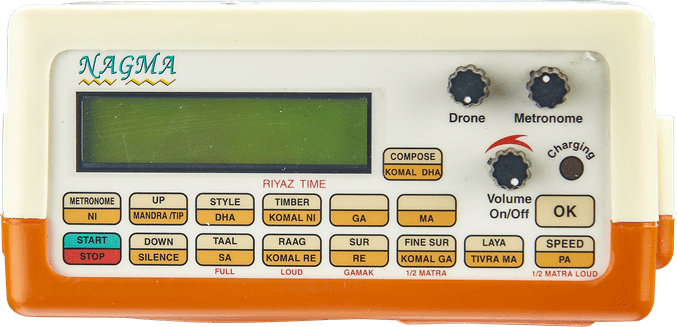
- The green backlit digital display of the Nagma electronic Lehra enables the user clarity while navigating thought the menu & otherwise also.

Metronome with Multiple Laya
- Nagma is the only electronic musical instrument the comes with a metronome with multiple layas including the odd layas like Trigund & Khand.

Laya
- Dhruth, Madhya & Vilambit:- The Nagma electronic Lehra is equipped to play in different Layas with ease. This Laya setting is independent of the speed setting that exists in the instrument.

Pitch Range
- Nagma Lehra comes with a large pitch range to suit every user’s needs. Its range is from B to C# of the 2nd octave.

Auto Memory
- Nagma has a full auto memory storage to store the last used taal, sur & laya parameter that helps if play the user’s last setting whenever the instrument is switched on.

Composer
- The composer feature of the Nagma electronic Lehra is capable of composing & holding in its memory 4 tunes with up to 95 mantras each.

Riyaz Time Indicator
- The digital display of the electronic Lehra has a column indicating the time of riyaz to help gauge the student Know the actual time of tabla practice put in.

Light Weight & Compact Size
- The weight of the actual Nagma is just 1 Kg & the same come is neat & sleek compact looks.

External Speaker Socket
- The Nagma Lehra has an external speaker socket to connect it to bigger external speakers if necessary.

Carry Bag
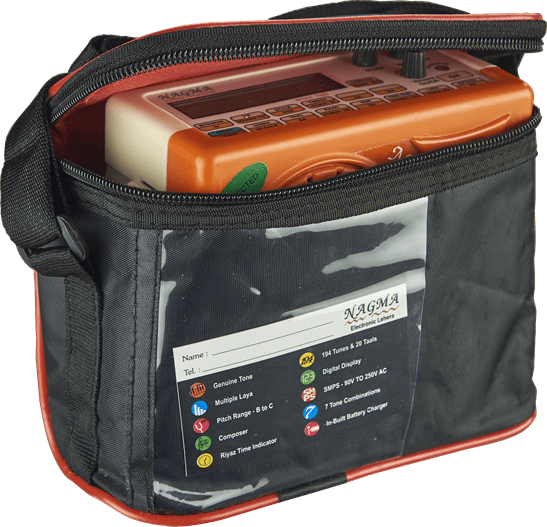
- The Nagma comes in an easy to carry nylon bag.

OPERATING INSTRUCTIONS

QUICK START
- While using Nagma for your Tabla practice you will need to set these 4 items in your instrument.

1. The Taal you want to practice.
2. Your selection of Raag (Tune) for that Taal.
3. Set the Nagma pitch to that of your tabla.
4. Select your Laya & speed for practice.

1. Plug in the mains cord; two pin male socket into your AC power supply & female socket in the male socket of the instrument.
Note: Add-on flat two pin AC converters available.

2. Switch on the instrument using the Nagma knob.
Note: The display indicates the last used Taal.

3. Press Taal key & the display will indicate different options of Taal. Select the desired Taal by navigating with the Up & Down key and press Ok key to set the Taal for your practice.

4. Press Raag key & the display will indicate different options of Raag. Select the desired Raag by navigating with the Up & Down key and press Ok key to set the particular Raag of that Taal for your practice.
Note: Each Taal has a set of Raag to be selected from.

5. Press Start key and the Nagma is heard. Adjust the volume by using the Nagma Knob. The display indicates the Matras as the Nagma is played.

6. Press Sur key while Nagma is playing and the display changes to indicate the present Sur at which the Nagma is being played. Pressing the Up & Down key helps in reaching the desired Sur.
Note: Sur is displayed in both Hindustani & Western notations (Safed 1 - C).

7. For fine tuning of Sur, press the Sur Fine key followed by either Up or Down key as required.
Note: When the display extreme right indicates “<C> " at Fine Sur it means that the Main Sur is at its natural Note : As you press Down key you will notice the display at extreme right changing to " << " symbol indicating that the Sur you are hearing is lower than the natural note. Similarly when the Up key is pressed Nagma displays " >> " symbol on the extreme right of the display indicating that the Sur you are hearing is higher than that natural note.

8. Press Laya and the display indicates the Laya at which the instrument is playing. Change the Laya by pressing the Up or Down key. This sets the required Laya of the instrument for your practice.
Note: The display shows Dhrut Laya, Madhya Laya or Vilimbit Laya as per your selection.

9. Press Speed and then the Up or Down key to set the required speed.
Note: The display indicates the speed in beats per minute.

Taal Key
- Displays the available list of Taals which can be selected using the Up or Down key.
Note: Pressing the Taal key when Nagma is playing changes the display from Mantra indication to currently playing Taal name.

Raag Key
- Displays the available list of Raga which can be selected using the Up or Down key.
Note: Pressing the Raag key when Nagma is playing changes the display from Matra indication to currently playing Raag name.

Sur Key
- Displays the available list of Sur / Swar / Pitch which can be selected using the Up or Down key.
Caution: Do not use the Sur key to check the Sur, as you may have fine tuned your Sur. Pressing the Sur key when the Nagma is playing changes the display from Matra indication to currently adjusted natural Sur.

Fine Sur Key
- Is Only Available when Nagma is playing and is used to change in small steps in between up to one Sur above or below the selected Sur. The same can be achieved using the Up & Down key.
Note: Pressing the Fine Sur key when the Nagma is playing changes the display from Matra indication to currently adjusted Sur, including fine Up or Down from the natural note.

Laya Key
- Display available Laya list, the same can be selected by Up and Down keys.
Dhrut Laya >> Madhya Laya >> Vilambit Laya
Note: Pressing the Laya Key when the Nagma is playing changes the display from Matra indication to currently set Laya.

Speed Key
- Display the current speed settings in beats per minute, which can be made slow or fast by using Up or Down key.
1. Dhrut Laya - 120 beats per minute to 600 beats per minute
2. Madhya Laya - 60 beats per minute to 300 beats per minute
3. Vilambit Laya - 30 beats per minute to 150 beats per minute
Note: Pressing the speed key when the Nagma is playing changes the display from Matra indication to currently adjusted speed in beats per minute.

Metronome Key
- Displays the available metronome mode list, which can be selected by using the Up or Down key.
Following is the list of metronome types available.
1. Single Beats (1 Stroke per Matra)
2. Dugun Beats (2 Stroke per Matra)
3. Trigun Beats (3 Stroke per Matra)
4. Chaugaun Beats (4 Stroke per Matra)
5. Khand Beats (5 Stroke per Matra)
Note: Pressing the metronome key when the Nagma is playing changes the display from Matra indication to currently Metronome type.
Note: Adjust the volume of the Metronome knob to a suitable level. Turning the Knob anti-clockwise can switch off the Metronome to zero volume.

Timber Key (Tone)
- Nagma is equipped with different types of tones to reproduce single line harmonium, two-line harmonium and three-line harmonium. Timber can be selected by using Up & Down keys.
1. All sur
2. Madhya + Mandra
3. Tip + Mandra
4. Tip + Madhya
5. Only Mandra
6. Only Madhya
7. Only Tip
Note: Pressing the Timber key when the Nagma is playing changes the display from Matra indication to currently selected Timber type

Style Key
- Nagma has 2 style of producing the note. First is with emphasis (Loud) at particular matra and second one is plain where only the sum is of higher volume & all other notes are emphasized. Style can be set using the Up & Down key.
1. Strong notes
2. Plain
Note: Pressing the style key when the Nagma is playing changes the display from matra indication to currently selected style.

Compose Key (Program)
- There are 4 tune numbers which can be used by the user to compose 4 of there own tunes, up to 95 matras each. Either of the 4 tunes can be selected by Up or Down key.
1. Tune.1
2. Tune.2
3. Tune.3
4. Tune.4
Pressing OK will allow the user to program at any of the 4 locations.
Note: Pressing the compose key when the Nagma is playing changes the display from matra indication to currently selected tune number & also plays the same tune.

OK Key
- Pressing OK key will make instrument accept whatever is displayed on the display during various selection. It also acts as an enter key to change between two functions (i.e. from Taal to Rage or Raag to Sur quickly.)

Up & Down Key
- Allows the display to scroll Up and Down in various functions.

Start & Stop Key
- Starts and stops the Nagma from playing. Also acts as a finish key in programming mode

Volume Control Knobs

Nagma
- On /Off switch for the whole instrument and adjustment of volume for the whole tune (Nagma)

Metronome
- Adjustment of volume for metronome. Keep it at zero (full anti-clockwise) for NO metronome.

Drone
- Adjustment of volume for drone normally used to tune the Tabla instrument. Press Start Key keeping Metronome and Nagma volume to minimum.

General

Product Spec.
- Weight (0.500 g), Length (15 cm), Height (13 cm) & Width (8 cm)

Warranty

1 Year Warranty
- Nagma Instrument is warranted against defects arising out of faulty of defective materials or workmanship for a period of one year from the date of purchase.

Included In The Box

  • Musical Instrument

  • Carry Bag

  • Instruction Manual

  • Power Cord (3 Yards)

Nagma

Nagma

Good Riyaz needs more than repetition—it needs structure. Sound Labs Nagma includes a metronome with Single, Dugun, Trigun, Chaugaun and Khand beats, plus a Riyaz time indicator to help students track actual practice time. If you have questions or concerns while using the instrument, the Sound Labs support team is on call by phone, WhatsApp, or email to assist. Click the button below to download the Nagma operating manual in PDF format.

Download Instruction Manual

Improve your Music

Never let practice feel repetitive. Sound Labs Nagma offers Tabla players and Kathak dancers a rich bouquet of 194 tunes across 20 Taals, keeping every session fresh and musical. Choose from 7 harmonium tone combinations, 2 playing styles, multiple Layas and accurate pitch settings. Manufactured by Sound Labs with strong product engineering and after-sales support, Nagma makes everyday Riyaz more engaging and performance-focused

Free shipping

Nagma, Built for Rhythm Discipline.

Nagma, Built for Rhythm Discipline.

Take your Tabla Riyaz and Kathak practice to the next level with Nagma by Sound Labs. This compact Lehra machine offers 20 Taals, 194 tunes, genuine harmonium tone, multiple Layas and a built-in metronome to support confident rhythm practice. With auto memory, pitch control, a digital display, and independent volume for Nagma, Drone, and Metronome, it is built by Sound Labs for serious learners, performers, and teachers.